
Photo Editor Collage: Picsa3.1.17 - Google Play
You'll be able to see results in few seconds.
Publisher Description


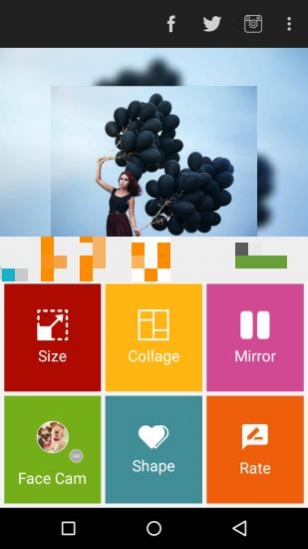

Photo collage maker: Photo edit with picmix stickers for photos, fun grid art!
Picsa: Photo Grid & Pic Collage Maker - Your Creative Photo Studio!Picsa: Photo Grid & Pic Collage Maker does all of that and more with just a few taps. The modern Foto Grid Picture Collage can help with creating a grid art, drip effect, and even adding spirals of neon, stickers, and filters to your photos. If you are keen on building a side by side collage of pictures, or even want to enhance selfies with artistic filters and effects, this Pic Stich Photo Editor app gives you everything in one place. Building a collage has never been such a breeze.
📄
Picsa: Photo Grid & Pic Collage Maker Key Features:
📄
📸 Create astonishing layouts using foto grid picture collage tools;
📸 Pic Stich Photo Editor and precision with detail in Side By Side Photo Collage Maker;
📸 Use powerful comparison edits with Retouch Photos And Edit Pictures;
📸 Add retro, sparkle, and glitch themes with explore filters and effects: photo editing app;
📸 Add depth with Photo Effects: Foto Editor features like drip and spiral, foto editor effects;
📸 Edit with customization by adding stickers, fonts, and emojis;
📸 Masterpiece saving and sharing is easy from the app;
📸 Templates for effortless use and design for any photo grid are pleasing.
Unleash Your Creativity with Side By Side Photo Collage Maker!
You can do anything and everything with Picsa: Photo Grid & Pic Collage Maker. Craft stunning layouts with a wide range of collage templates and borders at your disposal. Whether it's vacation photos or just candid selfies, every photo can be transformed into a creative visual masterpiece with the Side By Side Photo Collage Maker tools. Add stickers, frames, and Retouch Photos And Edit Pictures to personalize your photos and put your style at the forefront.
Every Mood: Filters And Effects: Photo Editing App!
🤳
Foto Grid Picture Collage lets you Retouch Photos And Edit Pictures without switching between different Photo Effects: Foto Editor tools because all the editing options are available within the Edit Photos Picture Editor app. With additional Photo Effects: Foto Editor features, there are an array of editing choices!
Very Powerful Pic Stich Photo Editor!
🔥
From dreamy sparkles to shadows with a vintage ending to glitchy effects, Edit Photos Picture Editor is here to serve a variety of themes and moods. Foto Grid Picture Collage helps you maintain a smooth edit while getting a professional look, which brings uniqueness to your photos.
Compare, Create, And Share!
😎
Edit Photos Picture Editor is more than just an Pic Stich Photo Editor app; it is a complete package of soured creativity tools. Edit photos and apply filters and stickers or utilize the app’s magic features to showcase your skills. Every detail, from the text to a spiral overlay, brings elegance to the photo, making it a piece of art.
Start Creating with Picsa: Photo Grid & Pic Collage Maker Today!
For simple edits and creative artistry, Picsa: Photo Grid & Pic Collage Maker is the app of choice. Dive headfirst into the collage maker with integrated effects and filters: picture editor options. The blend of creativity with convenience makes Picsa an unrivaled app for photo retouching and editing, unlocking a world of filters and effects: photo editing app features. Enjoy your photos as they tell your story on your terms.
About Photo Editor Collage: Picsa
The company that develops Photo Editor Collage: Picsa is Prometheus Interactive LLC. The latest version released by its developer is 3.1.17.
To install Photo Editor Collage: Picsa on your Android device, just click the green Continue To App button above to start the installation process. The app is listed on our website since 2026-09-10 and was downloaded 0 times. We have already checked if the download link is safe, however for your own protection we recommend that you scan the downloaded app with your antivirus. Your antivirus may detect the Photo Editor Collage: Picsa as malware as malware if the download link to com.lyrebirdstudio.montagenscolagem is broken.
How to install Photo Editor Collage: Picsa on your Android device:
- Click on the Continue To App button on our website. This will redirect you to Google Play.
- Once the Photo Editor Collage: Picsa is shown in the Google Play listing of your Android device, you can start its download and installation. Tap on the Install button located below the search bar and to the right of the app icon.
- A pop-up window with the permissions required by Photo Editor Collage: Picsa will be shown. Click on Accept to continue the process.
- Photo Editor Collage: Picsa will be downloaded onto your device, displaying a progress. Once the download completes, the installation will start and you'll get a notification after the installation is finished.
Program Details
System requirements
Download information
Pricing
Version History
version 3.1.17
posted on 2026-09-10
version 3.1.10.3
posted on 2025-12-30
Improvements
version 1.2.2
posted on 2016-12-05
* Smart sticker position selector.,* New gallery layout.,* Crop tool for collage photos.,* New animal stickers.,* 20 new photo frames.,* 46 new special collage layouts.
Disclaimer
Official Google Play Link
We do not host Photo Editor Collage: Picsa on our servers. We did not scan it for viruses, adware, spyware or other type of malware. This app is hosted by Google and passed their terms and conditions to be listed there. We recommend caution when installing it.
The Google Play link for Photo Editor Collage: Picsa is provided to you by apps112.com without any warranties, representations or guarantees of any kind, so access it at your own risk.
If you have questions regarding this particular app contact the publisher directly. For questions about the functionalities of apps112.com contact us.
